There’s no clear “roles” assignment as a classic MMO would want. Although this is an interesting and refreshing choice, it comes with some gameplay issues:
New World
I analyzed this game from a UX perspective after playing it for over 1,000 hours. This article, written shortly after the release, covers insights gained through extensive gameplay, highlighting areas for improvement.
Case Study
September 12, 2021
Note: This article was written between the OPEN BETA and shortly after the launch of the game. Things mentioned below might have been improved/reworked already and not look like this anymore.
Party creation issues
1. Lack of Roles
- Players can’t assign or auto-set roles (Tank, Healer, Damage Dealer).
- No role selection based on gear or manual flagging.
- No way to inspect other players’ gear.
- Group members are only identifiable by colored nicknames.

Major frustration factors:
Time consuming
Players must ask roles in chat and wait for replies, making the process tedious and time-consuming.
Inefficient role management
Players waste time inviting and kicking members after realizing their roles don’t match, leading to frustration.
Role misrepresentation
Some players may lie about their role, forcing the group to abandon the dungeon upon discovery.
Fix ideas
Role flexibility needed despite dynamic class system
While the game offers a dynamic class system, PvE content still requires balanced groups with Tanks, Healers, and Damage Dealers. Since roles can’t be reliably determined by equipped gear, allowing players to manually select their preferred role would improve group formation. However, this alone won’t prevent players from misrepresenting their role. To address this, an Inspect feature should be added, letting players verify each other’s gear when needed.

Strategy plan issue
2. Warboard UI
The window where to plan and arrange an assault is lacking basic and much needed information.
- Lack of role visibility makes strategy building harder.
- Player levels are only visible when hovering over names.
- No online/offline status indicator in the Waiting List.
- The Standby List gets overcrowded, requiring filters or role/level visibility.

Major frustration factors:
Time consuming
Company leaders must closely monitor each member to assess their level and form appropriate groups, which is highly time-consuming.
Standby List Issues
With 10+ pages of sign-ups missing role, level, and online status, the list becomes frustrating, time-consuming, and unusable.
Poor attack strategy
A non-user-friendly Warboard makes war planning difficult, leading to poor strategy, potential territory loss, frustration, and financial setbacks.
Fix ideas
More info about players
In the previous chapter, I highlighted the importance of roles, which directly ties into this issue: I need to know who I’m placing in war groups.
When linking this to the Standby list, I need visibility on the roles, levels, and online status of players who signed up. These details are essential for strategy and victory. A max-level player could be buried in the list, unnoticed, while weaker players get selected. Without a better system, I’m forced to manually check each sign-up, leading to poor team compositions.
Since New World is heavily PvP-focused, it must offer better war tools—players invest money in territories, and inadequate tools increase the risk of losing them.

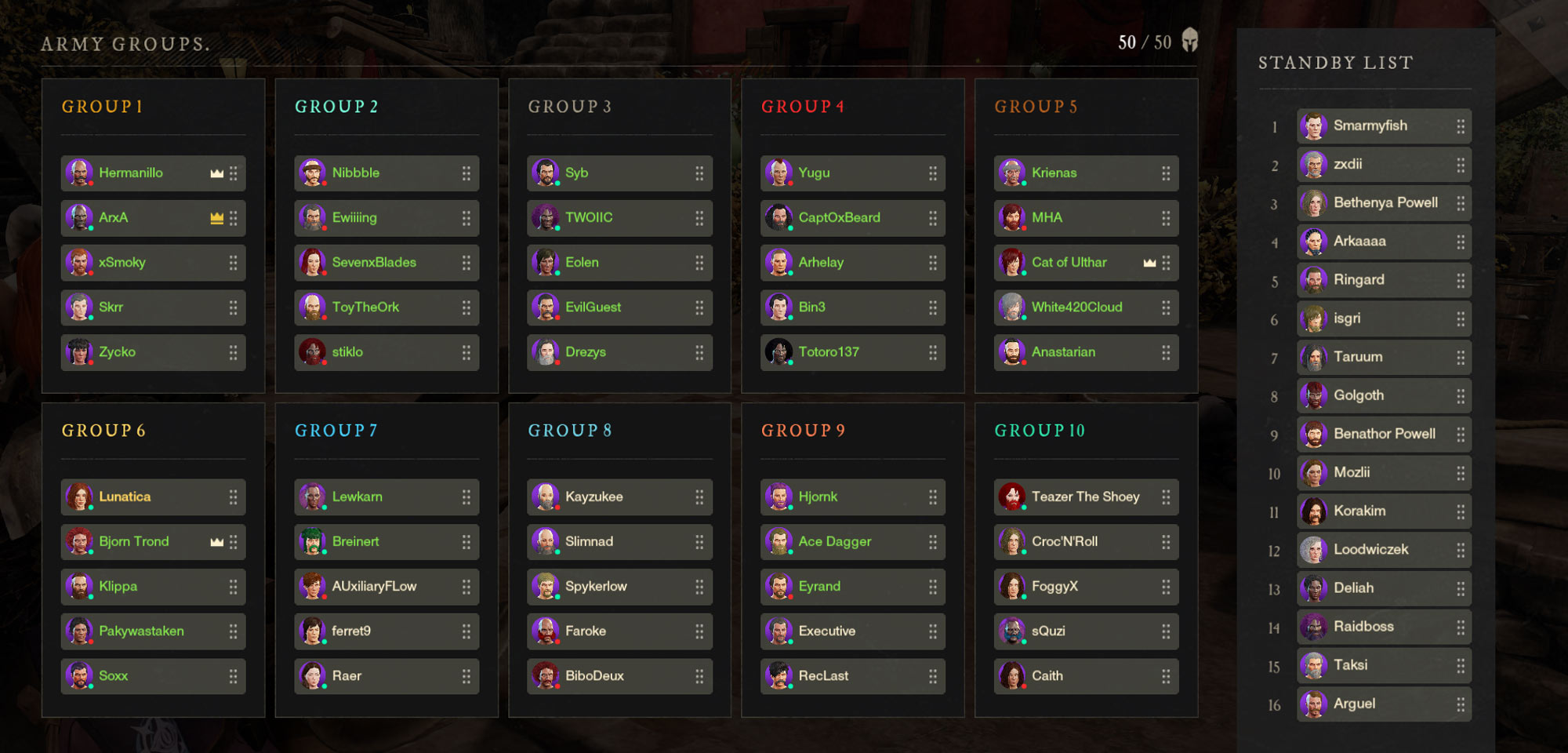
1
Missing Role
Again would be great to be able to see the role of players in the groups, to balance them better
2
Level
Display the level of the people without having to hover on each of them
3
Level & Role
This is the Waiting List so it would be very important to quickly be able to pick someone high level or the roles the leader needs the most
4
Online or Offline
Seeing who is online at the moment is very important when it’s time to start the war. This feature is not included in the Waiting List, but would be nice to have.
5
Filter
The Waiting List for this war had over 10 pages of players. It was impossible go through all of them without the possibility for example to filter by level or again by role
HUD Issue
3. Camp is too far
This was newly introduced in the last Open Beta: when your respawn camp is outside of 500m range, it becomes unavailable for respawn. The icon, which normally is dark yellow becomes bright red.
- The color chosen, red, is too menacing. It’s great to signal players that the camp is unavailable but I believe choosing another color would have been better.

Major frustration factors:
Inconsistent UI Design
This choice doesn’t align with the game’s HUD/UI. Red is rarely used, except for enemy threats, making it confusing and unnecessarily alarming.
Fix ideas
Inactive coloring
Change the bright red color to a neutral shade like gray, commonly used for “inaccessible” or “disabled” elements. This reduces visual urgency and prevents the icon from feeling threatening to the player.

HUD Issue
4. Chat
The chat topic is complex, with several aspects to address. The current design feels off, so let’s break down the major issues with this HUD element:
- Text containers are too large, with excessive decorative space for each message, taking up unnecessary screen space.
- The spacing between messages is too wide, leading to even more wasted space.
- There’s no dedicated “SAY” channel, so “AREA” chat becomes the closest option, frustrating players with simple messages like “Hi” or “What’s up?” that should only be seen by those nearby.
- Social gestures are posted in the area chat, visible to all players, and can be spammed, cluttering the chat with emote spam.

Major frustration factors:
Obnoxious UI
Each bubble’s size forces the chat area to refresh constantly, displaying new messages every second, which becomes distracting and keeps drawing the player’s attention due to the constant animation.
No proximity chat
Knowing that a simple “hi” will be visible to everyone within a 4km range discourages socializing. This setup is counterproductive, as it doesn’t foster casual interactions between players.
Chat covers gameplay
A significant portion of the HUD is occupied by the chat, not due to the volume of messages, but because the visual design of the message bubbles is too large. This results in unnecessary gameplay distraction.
Fix ideas
Chat Overhaul Needed
Given the many issues, a complete redesign of the chat seems necessary. I’d focus on prioritizing the most important factors, like essential communication, while minimizing less relevant elements (e.g., emotes). The visual style should be less intrusive, blending more seamlessly with the HUD to avoid distractions.
Additionally, implementing a local chat channel, where only nearby players can see messages, would be crucial to encourage more personal interactions without cluttering the server-wide chat.
Game Design / Onboarding
5. Starting with Friends
Spawning is randomized across three regions, making it impossible to ensure you and your friends start in the same place.
- Random spawns prevent players from starting in the same location.
- Reaching a friend is not easy, as there are many levels and main missions to complete before playing together.

Major frustration factors:
Frustrating Solo Start
An MMO is typically a game where players join with friends. Having to level up alone for no clear reason creates a frustrating experience, breaking the social aspect of the game.
Fix ideas
Spawn together
The best way to fix this issue would be to give players the option to choose their spawn location, with an additional button for random spawning for those who prefer it. This would allow friends to select the same location and spawn together, ensuring a smoother social experience.

UX Issue
6. No Treasury Logs
- The operation logs don’t track who gave or took money from the company treasury, making it dangerous. Money can disappear, and without this information, it’s impossible to identify the culprit.

Fix ideas
Public record of actions
Companies (Guilds) can accumulate significant amounts of gold, and members can withdraw or donate to the treasury. It would be helpful to have a Donations/Withdrawals log, allowing easy tracking of who contributed or took money from the company treasury.
UX Issue
7. Gear types
The game uses gear sets to provide players with various boosts, such as a 5% chance to get rare items while harvesting, along with other bonus effects.
- Carrying all gear around is problematic, especially since you lose coin to repair your gear every time you die.
- Inventory space becomes limited due to the need to carry different gear for specific resources.
- It’s extremely time-consuming to figure out what each piece of gear does, as you have to hover over every item to check its effect.


Fix ideas
Spawn together
The current system would be much better if trade skill bonuses (Harvesting, Logging, Skinning, Mining, Luck, and Fishing) were applied in a different way, rather than requiring players to carry all the gear.
For example, to fully benefit from Harvesting, you need six pieces of gear (Head, Chest, Gloves, Pants, Shoes, and Amulet), which applies to each of the six farming categories—36 items in total, taking up valuable inventory space.
Recognizing these pieces is also difficult without hovering over each one or using the search bar. A better solution could be removing the bonuses from gear and having them apply through other objects or skills that can be easily equipped from elsewhere.
For instance, a specific potion could be used to provide bonuses, starting at 0% and increasing as you gather flask fragments. This would eliminate the need to constantly carry around multiple gear pieces and simplify the process.
UX Issue
8. Perks & Attributes
Player gear can have various attributes that need to be selected based on gameplay style and weapons. For example, a gear piece might have +20 Intelligence and +10 Constitution, or +30 Dexterity, and so on.
- Each gear combination has a specific name, called a “suffix.” For example, a full Intelligence item (+30 INT) is “of the Scholar,” and one with both Intelligence and Constitution (+20 INT +10 CON) is “of the Druid,” with up to 25 possible combinations to remember.The system used to search for specific attributes on gear and weapons is one of the least user-friendly and least usable features in the game.


Major frustration factors:
Suffix Complexity
The suffix system forces players to remember the exact names of each combination to understand what they’re looking at, making it extremely complex and demanding.
Time Consuming
Players must manually hover over each item to determine if it’s suitable for their build, making the process time-consuming.
Buying items is a nightmare
Searching in the game’s trading post is tedious due to the many suffix combinations, each with different rules when selected, making it complex, time-consuming, and frustrating.
Fix ideas
Search & Filtering
While categorizing so many attribute combinations is challenging, improving the shop’s search function would greatly reduce the time players spend searching for the right gear. Merging the “Armor” and “Weapon” filters would be helpful, as they are identical but currently duplicated. Additionally, implementing a search bar would allow players to quickly find the desired suffix filter, cutting down on scrolling time.
Final thoughts
New World is a game I played for ~1000 hours. It’s an amazing game with a lot of potential but many things could be improved, QoL changes are needed in order to ease the experience especially for those folks who play it competitively.
Disclaimer: I did not work on this game or for Amazon Games; this analysis is from a customer’s perspective. All images in this article are property of Amazon Games.